The New Yahoo Mail: 5 Things You Need to Know
Dec 11, 2012 12:57 PM EDT by Brad Chacos, LAPTOP Contributor Do you Yahoo? For a large number of email users, the answer’s still a solid “Yes.” Good old Yahoo Mail started to feel bloated, cluttered and, well, old now that streamlined services like Outlook.com are the norm, though – which makes today’s introduction of a new-look Yahoo Mail an especially welcome change. Here are the five things you need to know about the new Yahoo Mail.
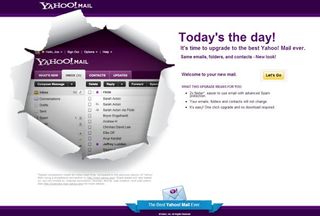
The Emperor’s new clothes – Yahoo overhauled its email clients to cut the clutter and give them a fresh, clean look. The service places your messages front and center, with folders segregated to a small left-side pane (which is hidden on mobile devices). Sure, it looks like every other webmail service, but that’s a good thing.
Seamless design – Yahoo updated its Android and iOS apps as well as its Web client to bring that new look to every possible Yahoo Mail entry point, creating a unified experience that stays (basically) the same, no matter what platform you’re on.
Better, faster, stronger – In the blog post announcing the update, Marissa Mayer says that the email app was redesigned “with speed in mind.” Our brief fiddling with the Web client certainly feels faster than before. The company told The Verge that the Android app was rewritten from the ground up to increase speed while simultaneously using 20 to 40 percent less battery.
There’s a Windows 8 app! – Microsoft’s new platform may not have many apps yet, but now you can count Yahoo Mail amongst the crowd. The Windows 8 Yahoo Mail app blends the service’s new look with Microsoft’s familiar Modern interface.
You might not have it yet – The updated Web client is being rolled out gradually, though Mayer says that “Over the next few days, most mail users will begin to experience the new Web version of Yahoo! Mail.”
Mayer also says that this update is “just the beginning.” Hopefully she means it; over the past few years, Yahoo Mail has seemed content to stay safe while such services as Outlook.com and Gmail constantly push out new features and updates. This overhaul is a refreshing step in the right direction for Yahoo.


December 15th, 2012 at 1:49 am
The new Yahoo mail sucks.
It will not allow multiple attachments at once (must now attach one at a time)
AND will not show which files have been attached before you send or allow you to drop one if mis attached.
Previous version was perfect….
This new one is terrible for anyone who sends multiple attachments.
I guess they are saving bandwidth.
anyway I’m getting out of Yahoo mail…
December 22nd, 2012 at 11:35 pm
The back button works now. Hallelujah!
December 25th, 2012 at 3:32 am
Yeah i agree!! the new YMail is terrible..
I cant see the download button of the attachments >.<
December 27th, 2012 at 3:02 pm
TERRIBLE. I want the old mail back. Too touchy…attachement ability terrible.
December 27th, 2012 at 3:04 pm
HATE new YMAIL. IT is terrible. Hard to navigate – it won’t keep the
‘click’. Attachment feature sucks. I want the old version back.
WORSE on my android tablet. I had to take it off and go with another mail service.
January 7th, 2013 at 4:47 pm
I agree with BK.
The older version was perfect. It’s very difficult now to attach multiple files.
January 30th, 2013 at 12:31 pm
I, too, “hate” this new version. The scroll bar from the folders section is gone, making navigating to folders while looking at the emails list, or reading an email, much more difficult. There really needs to be separate scroll bars for the folders and email list/email.
The only way to get the scroll bars is to use their “preview pane”, which is a pain!
February 5th, 2013 at 9:02 pm
Dear Yahoo,
Sorry to be leaving you after so many loyal years, but your email service is pathetic compared to gmail and even worse, now you are implementing some kind of “user tracking” program to keep track of people’s IP address and prevent them from logging in when their usage pattern has changed and asking for phone numbers etc. Im sorry, but people go on holidays, login to their email from other pc’s, change pc’s, remove cookies when browser shutdowns, have privacy software etc etc and don’t want to give you their phone number either!
These common things are now stopping me (and others I know) from logging into our yahoo accounts, prompting us with ridiculous secret questions that we haven’t seen for years. I don’t fukn know what my secret answers are, that’s why I have NEVER forgotten my yahoo password in the first place. I go on holiday and when I come back i get the below message preventing me from getting into my email. This has not happening for the past 10 years but suddently you are tracking peoples IP, asking for phone numbers, secret questions and finally blocking our email accounts. Enough is enough!
I hope Yahoo is not trying to beat their own business into the ground by doing this, because as far as I see it, your “other services” rely on traffic from yahoo email users! What a bad business decision from a pathetic group of internet elders.
Bye bye yahoo, hello Gmail!
Here is the crap you are showing on every 2nd login attempt, even after successfull logins the day before….what a crazy confused “security system” you have Yahoo.
“Confirm Your Identity: Answer Security Question
You are logging in from a device we don’t recognise. Learn why For your account safety, please answer your security question below.”
February 25th, 2013 at 3:11 am
Yahoo — haha. Yahoo was my primary for 5+ years; then biz accts + gmail were secondary. But I gave up on yahoo for reasons michelle cited above, and more: sloooowness w/mobile devices, periodic bizarre rejection of verified-correct passwords resulting in lockout, BUT spam and security/hackability issues.
I also knew TOO many ppl whose yahoo accts got hacked despite vigilance, regular password changes, etc. Psswd rejected and all of their contacts got hacker-spammed. Recovery was useless.
Got to point where only my yahoo acct got spam … and 1/4-1/3 of it came from hacked yahoo accounts.
So I split yahoo.
March 1st, 2013 at 10:26 pm
My intention to move on, but gmail – copyright issues
Paid is probably the answer
Latest news from yahoo, tyring to stop their workers, working from home
I guess in the same vein as this ‘new’ yahoo mail
I guess it’s free -so – shouldn’t complain
They have a killer super-large list and are in the process of destroying it, sad, sad
March 4th, 2013 at 11:12 pm
New version of Yahoo email is POS. Cannot do multiple attachment, back to single attachment. Want the previous version back..
March 6th, 2013 at 7:21 am
I’ve been to Yahoo help pages and they suggest trying a different browser so I switched to Chrome and it works!
March 8th, 2013 at 5:37 pm
Fire the Dead Weight Moron who signed off on this pathetic so called upgrade to hell! Seems one needs a ton of CPU and/or Ram to make this crapmail work.. On my P4 with 256 Ram card, it barely sometimes works, unlike the old mail… Gmail still kicks ass though!
Freakin disconnected corporate slugs trying to force hardware upgrades.. But, most likely, a bunch of dead weight in the R&d dept trying justify their worthless positions by changing a good thing for the sake of looking like they are doing something..
March 15th, 2013 at 1:25 pm
Gmail had become too much for me: I don’t like the GUI–just never got used to it. So less than a month ago I went back to Yahoo! after a hiatus of nearly a decade.
I am now leaving it. It is the most outrageous system I have ever encountered. Disgusting. Shortsighted. User unfriendly. Dumb. Clueless. Arrogant. Demeaning. Soviet. It is positively North Korean in its attitude to erstwhile users/customers.
Several times a day I am required to enter alpha-numeric codes to prove I am not a spam bot even though I am logged in and accessing from the same computer, day after day, sending to addresses that have been in my address book for years. This morning after an especially efficient 90 minutes of dealing with correspondence [about 10 emails] Yahoo! suspended my ability to send for suspicious activity.
They have the GALL to tell me that I have to wait for 48 hours before I can call to have it reset. I have already forgotten the name of their new CEO, but as far as I am concerned she should be baptized her with the contents of a diaper for running a business with such an attitude.
Yahoo! I am gone! Good riddance!!!!
March 20th, 2013 at 1:52 pm
I have to say the latest version is chronic.
If you want to use classic then there is a quick way back.
Set your screen resolution to 800 x 600 then login to yahoo mail. You will get a message telling you there is a problem with your screen res. Just say ok and your mail will open in classic format. Now you can set your screen back to your normal res. Your yahoo mail will now always open in classic format. To switch back to the new version just click at the top right to get latest version.
March 21st, 2013 at 12:20 pm
It drops users off of Reply All. I’ve hated Yahoo mail for a couple of years now, but with every “improvement” it gets noticibly worse.
March 27th, 2013 at 3:03 pm
I rely on yahoo mail for sometime now. They ruined it. I’m sooo close to switching to my gmail account as primary. Just basic things like
1. I can’t delete emails.
2. I can’t select multiple emails,
3. I can’t click on Reply.
4. The task clock spins and spins and spins, … where’s the speed?????
5. OMG it’s so frustrating. I want to go back to classic and I can’t now. So soon it’s goodbye yahoo.
I once thought I’d never switch from Eudora Pro, but Yahoo is trying my patience, better get those coders working!
March 30th, 2013 at 3:03 pm
I thought we were going to have a choice of classic or the new, all of a sudden my bookmarks are dead for my mail. Going with the crowd and will start using my Gmail as a primary now, I hate change especially when it is not on par with what it is supposed to be changing, much like today’s automobiles.
April 5th, 2013 at 1:45 am
I have had the same issues Scott referred to. Also, I can no longer access my mail from my phone; it tells me to log in from the desktop and try again. Of course, the failed login message suggests I log in using my Facebook account. No, thanks, Yahoo. Everyone I know who linked those accounts has had their FB account hacked. I am changing email providers.
April 13th, 2013 at 12:31 pm
I fully agree., First I wasn’t able to attach anything to my mail. I cleared pop-ups, temp files, everything people suggested. Then all of a sudden an new screen pops up and lo and behold, I can attach. The problem is, now they’ve crammed my e-mail into a small section of the screen to the right. Of course not far enough to block out their friggin advertisement, but enough to leave a blank section on my screen. Trying to “talk” to yahoo is next to impossible. round and round to the “help” screen.
I’ve wasted serious time, had to circumnavigate to a “junk” email to send attachments and then monitor that e-mail for responses.
I’m reading posts that say, “maybe your computer is not able to handle Yahoo”. I just bought the thing 2 years ago! What, am I supposed to upgrade every friggin year to keep up with technology!?! If so, they’ve go a bigger grasp on us than I thought.
Now I have to 1. Get a new e-mail, 2. Let everyone know I’ve changed, 3. Monitor this stupid Yahoo, because I’ve used if for people that may need to contact me, government agencies, clients, etc. 4.Get people used to he new e-mail.
It’s like losing your wallet. Thanks Yahoo. Thanks a lot for not giving a shit about what you do. forcing your crap that still isn’t ready and letting the public figure your shit out. THANKS and FU
April 16th, 2013 at 7:25 pm
Close your doors and go home yahoo, I will not be the word “yahoo” anymore.
April 18th, 2013 at 8:51 pm
Hi:
I agree with what I read above. It is clear that Yahoo regards itself like a Browser, in itself, and gives email-flexibility the finger. You can’t click on contacts (for use in the BCC box — only for primary addresses); the ‘search’ function is totally wasted. Yahoo (old) had great search function. You could specify searching In or out going mail from/to anyone on your contact list; specify date range; enter part of a subject line. With the new Yahoo, you can’t even speicify whether you are looking for a mail you sent or one you received or if it had an attachment like ?? and then they even took away the capability to click off different ‘hits’ to different folders (In Box, or Sub mailboxes that you use to sort things you want to save. Whomever is responsible for all these omissions should be canned. I can’t change back to gmail or outlook fast enough. Yahoo calendar doesn’t seem to talk to my ATT HTC Android either. Yuck, yuck, Yuck Yuck, yuck, Yuck,Yuck, yuck, Yuck. Let me out of here!
April 18th, 2013 at 8:52 pm
Moderation? Right!
Yuck, yuck, Yuck
April 26th, 2013 at 7:18 am
I hope they still allow pop access on my iPhone 3 or I simply won’t update. I was using yahoo for online purchases – my spam box. Their past upgrades have all been rubbish, and this last one may sink ‘em for me, sounds like…
Pretty pathetic.
April 26th, 2013 at 7:22 am
I have never paid for their service and never would. It’s just too risky. They were the first to try to make you pay for what should be free and filled their pages with ads. Be vigilant, folks, google does this, too.
April 27th, 2013 at 12:22 am
I can’t find my Pop3 in the new email. I have my business email forwarded to my yahoo and now I can’t find it to download it. Help?
May 1st, 2013 at 4:20 pm
A dysfunctional offering, badly arranged, slow and parts don’t display quickly or properly if they show up at all..
Had to kill Javascript and force a reversion to Classic to get some functionality and speed back. — Classic’s feel and function is better and doesn’t have the biz-crud attitude and ineptitude.
I stuck with Yahoo precisely because it wasn’t Google or Microslop. — I’d rather not go elsewhere but will, if pushed.
Put the final changeover on hold. Find a way to do it right.
May 4th, 2013 at 5:01 am
Why, oh why, would Yahoo! takes something that is better than any other free email account and wreck it? Especially something that I’ve recommended to others!
These are my gripes:
• The very, very worst feature is that you cannot open each email in its own tab without automatically going to that tab. As I have literally thousands of emails (I get hundreds everyday as I belong to various groups), it’s important to open multiple emails in a short time and then cascade through them. Now it will mean each email has to be individual opened (and I cannot cascade through the tabs anymore, either); a hopeless waste of time and energy.
• Similarly, you cannot open each folder in its own tab to see multiple folder entries at once; an important feature when you have so many emails to view.
• On the subject of folders, you no longer have information as to how many files are in each folder as the column-width is too narrow, so information as to how many email one has is now hidden. (And resting the mouse for the caption to appear just slows things down even more).
• On the subject of speed, the sales pitch that the new system is completely false; it now takes much longer to load each email, especially when containing PDFs or images.
• You cannot sort your message by the size of the email (a feature of Yahoo!Mail Classic).
• It takes far longer to sort emails as only one drop down menu is now used, after each column had its own sort feature.
• The “Back” button takes you out of Yahoo!Mail altogether.
I now have to find another email provider and God-knows-how transfer all my files over, or just the most important emails—and that alone will take hours—and delete the account. Then I have to contact all other sites and organisations I’ve subscribed to and change the login and email details! NOTHING about this makes sense or is practical!!
RV
May 9th, 2013 at 11:49 am
I agree with the complaints voiced here.
The old yahoo was damn near perfect but the new version is damn perfectly awful. My #1 complaint is how horrible it works on my old 1gb ram PC; this new version seems weighted down with tons of scripting (or something).
Yahoo email is now “new Coke”. Unbelievable. It deserves to die the same death.
May 14th, 2013 at 9:38 pm
The writer of this “article” clearly either works for, or was ribed, by Yahoo’s CEO. Outlook is NOT the norm – it never was, except perhaps in some office environments. People need to understand that what offices use do not work for most people most of the time – even employees moan about how outdated their offices are (often specifically referencing Outlook). My hotmail account has only recently been forcibly changed to the old and often-derided Outlook format. I’ve had to use Outlook at Bolton University (a place that should really not be called a university or even a college) and it was terrible. A previous university that I studied at used some entirely different web-based e-mail system (not the web version of Outlook) and it was SO much better. Virtually never any problems, and unlike Bolton University’s web version of Outlook, there was plenty of storage space [Bolton's Outlook rubbish filled up after less than a year's worth of e-mails (despite many being deleted) - useless for a university].
I’ve found a way to switch back to Yahoo Classic Mail and it’s SUCH a relief. I can use clear flags oinstead of little stars for important messages, I can clearly see my folders (aong with folder icons) at the side and my specific personal folders that I created, and I can easily navigate it. Pushing out “new features and updates” is not a good thing just because they’re new.
For anyone who wants to switch back: Open your browser. Turn javascript off (in Firefox it’s Tools, then Options, then Content – the option to switch off javascript is there). Go to yahoo mail. Login. A message will appear. Don’t turn Javascript on yet – close the message by refusing to turn Javascript back on in the message that appears, and you should be in Classic. THEN turn Javascript back on.
BEWARE though – Yahoo have deleted email accounts for no reason before. So you’re better off switching to a different company anyway probably.
May 15th, 2013 at 12:16 am
Have to agree with everyone else — Yahoo Mail Classic was perfect, and there was NO reason to change it. I have several Yahoo mail accounts that I totally depend on, and can’t switch to something else at this point. Who was in charge of this POS change anyway, and may they rot in hell. It’s always the case, isn’t it, when you have something good, someone comes along and wrecks it.