
Samsung has sprung up after an incredible comeback, going from last place in 2019’s Best and Worst Brands faceoff to 8th place this year. There’s still a lot of improvements the company can make, especially in expanding their catalog, but Samsung has impressed us with the bold and colorful designs of their latest laptops. The Galaxy Book Flex 15 is particularly incredible, as it boasts a vivid display, incredible battery life and a gorgeous design. Hopefully Samsung can improve even further in 2021 by expanding towards mainstream, business and gaming laptops.

Samsung’s Key Strengths
- Colorful designs: Samsung’s laptops and Chromebooks are aesthetically phenomenal, often implementing bold and bright colors weaved within their aluminum exteriors to elevate designs to a whole new level.
- Much needed innovation: Samsung has certified itself as innovators with the introduction of the first QLED display within the Samsung Galaxy Flex 15. Additionally, the laptop's trackpad doubles as a charger for Qi-compatible devices and the company’s built-in S pen is great.
Samsung’s Main Weaknesses
- Lacking web and phone support: Samsung’s websites make it incredibly difficult to answer your own questions, often forcing consumers to get help by phone or through social media. Even then, the company’s phone service provided us with inaccurate information, making it difficult for consumers to get help in any and all avenues.
Top-Rated Samsung Laptops
- Best Laptop: Samsung Galaxy Book Flex 15
- Best Chromebook: Samsung Galaxy Chromebook
- Best Budget Laptop: Samsung Chromebook 4
Reviews (31/40)
We once told Samsung to stop making laptops. Well, over the past 12 months, the company has proven us wrong...to an extent. While some of Samsung’s newest laptops are knock outs, others make you question how much effort the multinational conglomerate is allocating to this category.
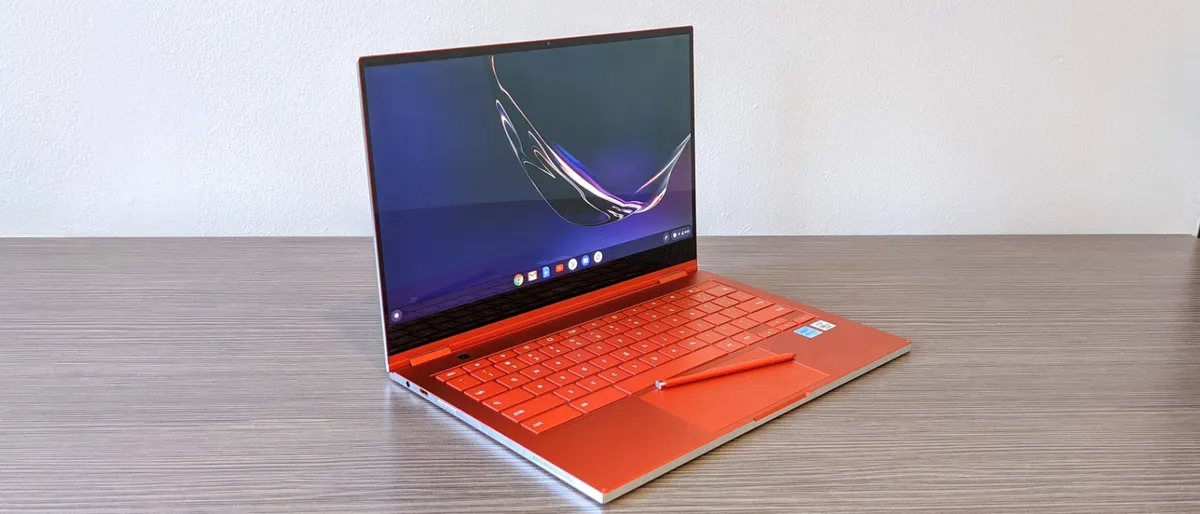
What gives us hope are laptops like the Galaxy Book Flex 15, a 4.5-star rated 2-in-1 laptop with a gorgeous QLED display, a built-in S Pen and epic battery life. We also had high expectations for the Galaxy Chromebook, but Samsung seemingly forgot that a portable laptop needs to stay powered when it’s not plugged in. The Chromebook 4 was also disappointing because it was a step backward from the excellent Chromebook 3.
Design (14/15)
The last few years have been rough for Samsung in terms of design. However, it seems the days of drab, uninspired design might just be over for the company with its latest slate of laptops. Let’s start with the Galaxy Chromebook, which is hands down the prettiest Chromebook of the year. With its fire-engine red aluminum chassis, it’s a bonafide head-turner. And with a thickness of 0.4 inches, it’s also the thinnest Chromebook on the market.

Not to be outdone, you also have the Galaxy Book Flex 15, a vision in glistening royal blue aluminum. It performs its 2-in-1 duties well, but we did notice that the hinges were a bit wobbly. And finally, there’s the Chromebook 4, which isn’t as flashy as its counterparts, sporting a silver metal lid with a plastic body, but still is pretty easy on the eyes as budgets Chromebooks go.
Support and Warranty (14/20)
Samsung provides a well-built website with easy-to-navigate pages and a straightforward user interface. Unfortunately, it’s lacking a collection of forum posts to help answer our questions. As a result, we relied on the web tech support team who provided accurate, patient and concise responses to our issues on Facebook and Twitter. However, the phone operators we spoke to provided us with incorrect information and tried to get us to send our laptop in when the solution was a simple visit to Windows settings.
Each Samsung laptop comes with a one-year limited warranty which covers defects and faults in craft. Accidents and normal wear are not covered in this, but Samsung will cover shipping fees. You can also upgrade to a two-year warranty for $190.
Innovation (8/10)
Samsung must have read our Best and Worst 2019 report, and leveled up. This warms my heart because this is, in part, why we have annual brand report cards — we want our beloved laptop makers to evolve into better companies.
Last year, Samsung was slapped with a dismal 5 out of 10 score for innovation. Well, this year, Samsung stepped it all the way up. The Korean tech giant presented us with the Samsung Galaxy Flex 15, which, in addition to its well-known S pen, featured the world’s first QLED display. QLED is a screen technology that allows the panel to remain power-efficient while emitting a bright, vivid display. It’s a solution that works because while bright, color-rich displays typically drain the battery, the Book Flex 15 is one of our longest-lasting laptops with over 15 hours of battery life. On top of that, the Book Flex 15’s trackpad doubles as a charging pad for Qi-compatible devices.
Samsung is also carving out a space in the laptop market for luxury Chromebooks with its bold and red, high-end Samsung Galaxy Chromebook that features a 4K AMOLED display.
Value and Selection (8/15)
Samsung has one of the thinnest laptop selections around. There aren’t any mainstream laptops, cheap gaming or premium gaming laptops, business laptops, workstations or rugged laptops.

The company covers premium laptops well enough with the Samsung Galaxy Book Flex 15 ($1,399) and jumps down to the sub-$400 range with its Notebook Flash series that we have yet to review. At the very least, Samsung does offer affordable Chromebooks, like the Samsung Chromebook 4 ($259), as well as premium Chromebooks, like the Galaxy Chromebook ($999).
In terms of gaming, Samsung only has the Samsung Notebook Odyssey Z ($1,799) and it’s nonconfigurable, so it’s not the best selection for gamers.


