1. Quick list
2. Best overall
3. Best budget
4. Best business
5. Best 2-in-1
6. Best gaming
7. Best workstation
8. Best 13-inch
9. Best 16-inch
10. Best Chromebook
11. Choosing the right HP laptop
12. How we test HP laptops
The best HP laptops cover a lot of ground. In fact, with so many fantastic laptops on the market, picking which one is best for you can quickly become an arduous affair of comparing configurations and understanding your personal use cases to make a well-informed decision.
With a catalog like HP's, that could result in an incredible amount of analysis paralysis alongside a fair chance of a headache or two as you needlessly split the hairs on which specs to chase and which specs to cast aside.
Thankfully, as the name might indicate, we're somewhat in the know about HP's laptop offerings here at Laptop Mag — and we've been doing the hard work for you. We review HP laptops year-round to ensure the brand's offerings are up to par, and luckily for you, there are plenty of fantastic devices to choose from.
Our selection of the best HP laptops is sourced from the highest-scoring machines in our review pool and features devices suitable for all walks of life and every budget. HP's vast and varied lineup has something for everyone, and we're here to help you figure out which one is best for you.
So, whether you’re looking for the premium, executive feel of the awesome Spectre lineup; the pulse-raising gaming potential of the Victus; the brilliant-for-business Dragonfly; or the budget-friendly Pavillion; let's dive into the best HP laptops of 2024.
Best HP laptops in 2024: Quick list

HP breaks into the AI PC market with a fantastic showcase of laptop excellence thanks to the 14-inch Spectre x360 with its speedy Intel Core Ultra processor and AI-enhancing NPU.
Read more below

The HP Envy x360 2-in-1 is an affordable laptop with a stunning OLED display and solid performance. Overall, it's a fantastic budget-friendly computing solution.
Read more below

Top tier design, potent performance, and an excellent keyboard make this built-for-business laptop one of the best options on the market today for users who make productivity a priority.

The HP Spectre x360 16 is a stylishly compact 16-inch 2-in-1 laptop that boasts a dazzling OLED display. Looks aside, the Spectre packs performance to cover your home and office demands with ease.
Read more below

With potent, perky specs, elegant design cues, and a solid FHD display. The HP Victus 16 is an excellent entry-level gaming laptop that won’t deplete your bank account.
Read more below

The updated ZBook Fury is lighter and more powerful than ever. This workhorse of a laptop is the ultimate tool in the arsenal of any high-level enthusiast, video editor, or 3D artist and is one stop solution for demanding computing tasks.
Load the next 3 products

Elegance personified, with enough performance to excite most on-the-go business users. The Spectre line-up houses one of the best 13-inch convertibles thanks to this small and spritely machine.
Read more below

A laptop designed to cater to a specific need is great, but a laptop that can do it all is greater. Performance, presentation, and premium build combine to make you the Envy of those around you.
Read more below

HP’s Chromebook is more than deserving of the Dragonfly name thanks to its premium design, fantastic performance and stellar webcam. It's a surefire for students and brilliant for business.
Read more below
Best HP laptop overall
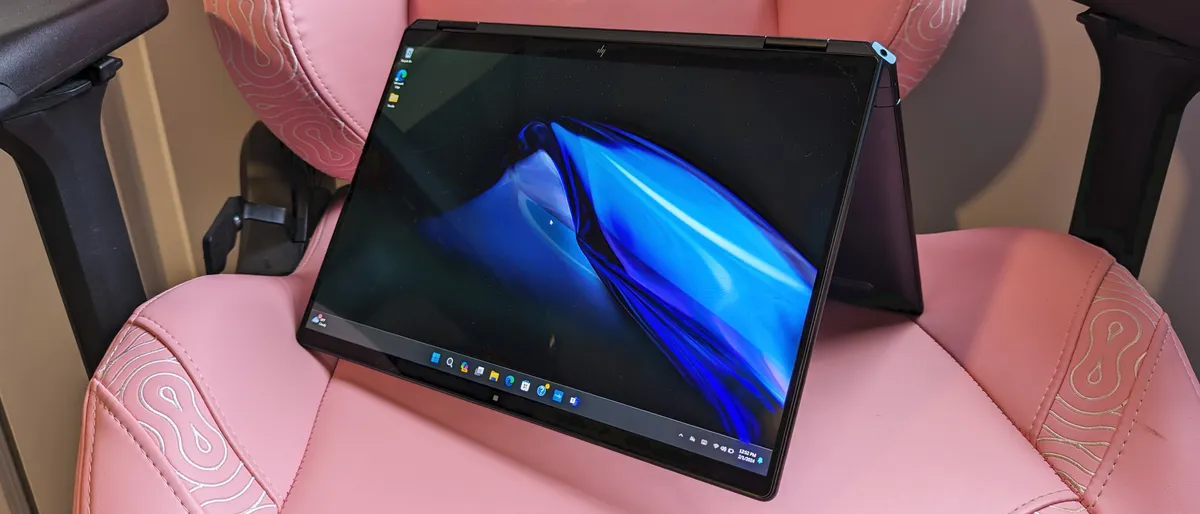
With AI PCs being the new standard in performance, HP have come out of the gate swinging with a fantastic all-rounder capable of doing the business in all key areas. The HP Spectre x360 14 is a well-sized convertible laptop with excellent performance, considerably aided in AI-related tasks by an Intel Core Ultra 7 processor outfitted with an NPU (Neural processing unit).
The inclusions of Intel's latest generation of chips is only half the story here, though. The Spectre also features a stunning 2.8K OLED display, a fantastic typing experience, powerful speakers, and a quality 4K webcam.
When you also factor in an impressive 11-hour battery life, this ultra-portable 14-inch laptop becomes a machine that's hard to deny as one of HP's best efforts to date.
See our full HP Spectre x360 14 (2024) review.
Best budget HP laptop

With powerful AMD Ryzen 7 performance backing it up every inch of the way, the HP Envy x360 2-in-1 is a 15-inch laptop that makes for an ideal computing companion, and, better still, won't break the bank.
With configurations starting way below the $1,000 marker, the Envy x360 is impressively accessible to a number of budgets, delivering a dependable all-rounder that looks impressively premium thanks to a slick design and vivid OLED display.
For the price, its one of the best HP laptops you can pick up, and it won't leave you wanting when it comes to taking care of your day-to-day computing needs outside of gaming, of course.
See our full HP Envy x360 2-in-1 review.
Best HP business laptop
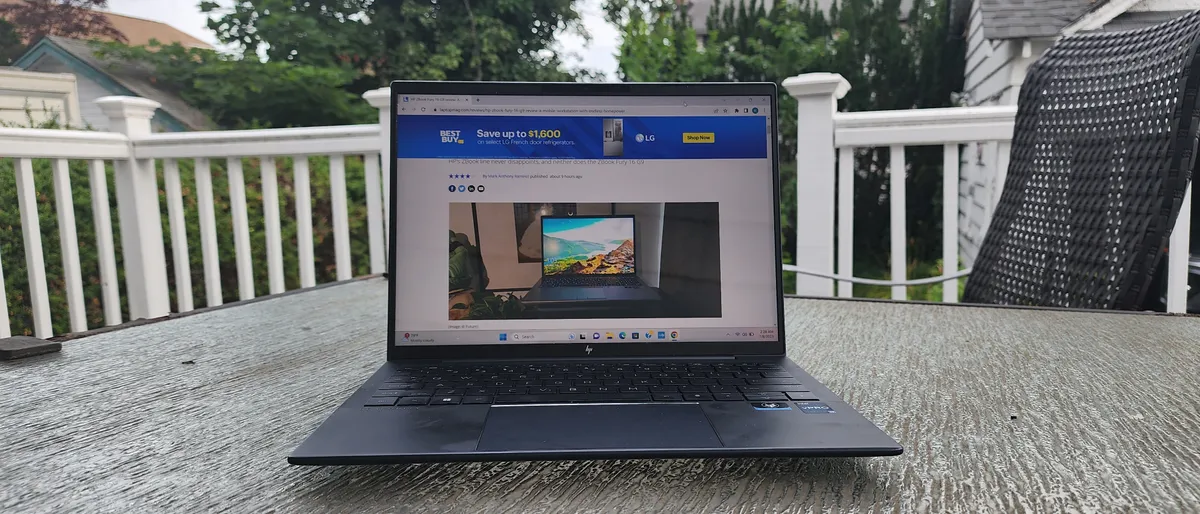
Forget any notion of a business laptop being a dull, lifeless husk of a machine, the HP Dragonfly G4 is true executive chic with enough power to get all but the upper echelon of users effortlessly through their 9 to 5 grind.
Outfitted with an impressive Intel Core i7-1365U vPRo processor, the Dragonfly G4 is well equipped to handle some intensive multitasking and a boatload of number crunching to boot. Backing this up is Intel's integrated Iris Xe graphics, 16GB of RAM, and 512GB of storage. In short, the Dragonfly G4 is a machine armed to slay any task your work (or school) day puts before you.
However, it's not all about the core components. The G4 has an exceptional keyboard that boasts a near-perfect typing experience, a 13-hour battery life, and a solid combo of speakers and webcam that are ideal for a Microsoft Teams turnout. Better still, at just 2.2 pounds in weight, the G4 is a highly portable computing companion that won't complicate your commute.
See our full HP Dragonfly G4 review.
Best HP 2-in-1 laptop

HP’s take on a 16-inch convertible laptop already impressed with a premium form factor and dazzling OLED touch screen, and now the brand has taken things a step further by outfitting its latest Spectre X360 16 with decent performance, too.
The 12th gen Intel Core i7 processor housed within is a solidly enough performing bit of kit, enhanced further by 16GB of RAM and a sizable 1TB of speedy SSD storage. That's plenty of power to perform most daily tasks and workloads, and the Spectre X360 makes it all look phenomenal across a dazzling 16-inch OLED touchscreen.
While this is a fantastic addition to any workspace, the 2-in-1 laptop is a boon for those who enjoy the duality of having a sizable tablet on hand at a moment's notice — greatly expanding on the laptop's portability and usage through a multitude of purposes.
See our full HP Spectre x360 16 (2022) review.
Best HP gaming laptop
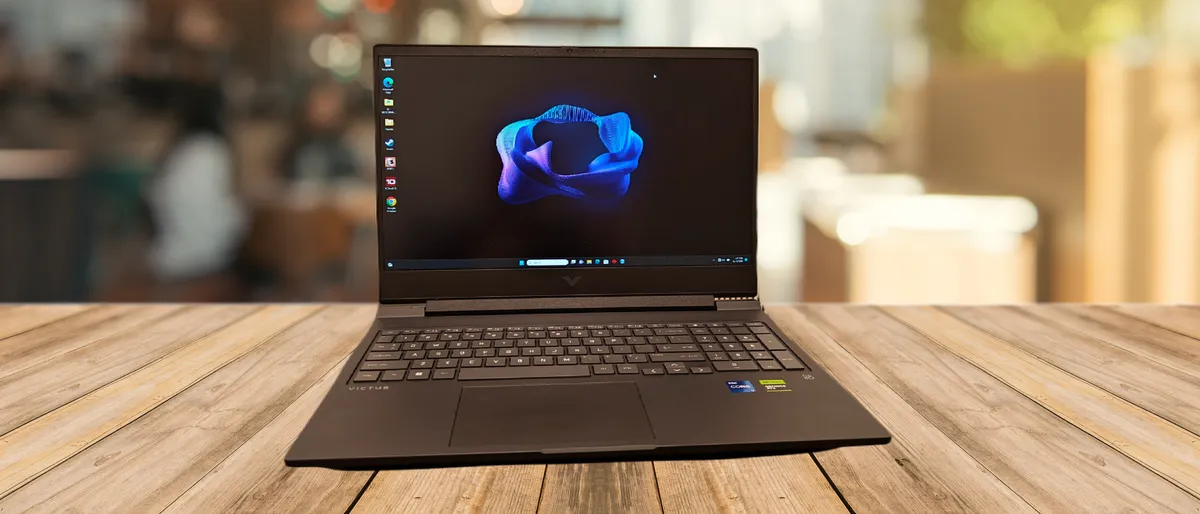
Super-fun and super-affordable, that's one way of describing HP's Victus 16. This entry-level gaming laptop houses some considerable power by way of a 13th Gen Intel Core i7 processor and Nvidia GeForce RTX 40-Series graphics, both of which combine to offer quality performance and impressive on-screen results.
Fans of lightning fast displays might feel a little undersold with this one, as the Victus 16 is locked to a 60Hz refresh rate. However, if you're not much of an ultra-competitive gamer, you'll still get to enjoy a pretty smooth frame rate with pictures that are both colorful and vivid – squeezing every inch of quality from the Victus' 16-inch panel.
See our full HP Victus 16 review.
Best HP workstation

When it comes to tackling the most intensive and demanding of computing tasks, the HP ZBook Fury 16 G9 is the laptop you need. Offering phenomenal power across the board, this workstation laptop is the ultimate tool in any arsenal and if you're a high-level video editor, programmer, 3D artist, or editor, accept no substitute.
The ninth-iteration of the ZBook Fury 16 is packed with premium components to deliver the most potent performance possible. Not only is the ZBook outfitted with an overclockable 12th Gen Intel Core i9 CPU, but it's also backed by a staggering Nvidia RTX A5500 GPU with 24GB VRAM and up to 64GB of RAM.
That's an ungodly amount of computing force to have at hand, and the ZBook pairs it with 1TB of PCIe NVMe SSD storage to adequately house your power-hungry projects. However, with great power comes equally as great a price tag, and that's something you'll need to heavily invest in to acquire. The model mentioned here costs a whopping $5,999.99 to pick up, though different configurations are available with the lowest tier starting at $2,350.
See our full HP ZBook Fury 16 G9 review.
Best 13-inch HP laptop

The HP Spectre X360 13.5 is more than just a shrunken-down version of its 16-inch sibling, it's an Ultrabook-level, portable productivity platform with oodles of potential and a genuinely stunning design to boot.
The Spectre X360 12.5 is a fantastic option for those who want to enjoy the hybrid levels of productivity offered by a 13.5-inch OLED tablet-like touchscreen and the comfortable desk-friendly traditional laptop format without ever needing to switch devices.
Regardless of which form you place it in, HP's Spectre offers impressive performance thanks to a 12th gen Intel Core i7 CPU, Iris Xe graphics, 16GB of RAM and a solid 1TB of SSD storage.
See our HP Spectre x360 13.5 (2022) review.
Best 16-inch HP laptop

How about a HP laptop that does a little bit of everything, and does it all surprisingly well? For that, you're best bet lies with the Envy 16 — a powerful and versatile offering that delivers on all fronts as a productivity workhorse and a casual gaming haven.
Not only does the Envy 16 come outfitted with a high-end 12th-generation Intel Core i9 processor, but it also features the striking graphics potential of a discrete Nvidia GeForce RTX 3060 GPU equipped with 6GB of VRAM. While this won't have you cranking every slider to the right on the latest, greatest, and most demanding of AAA games, it will provide a more than serviceable experience across most titles.
The Envy 16's internal components are only half of its entertainment potential, however. Another strong suit of this laptop is its, frankly stunning, 16-inch 4K OLED display. HP's panel is a dream for showcasing visuals, and a top-tier solution for watching films or TV on, too.
See our full HP Envy 16 review.
Best HP Chromebook

If you're in the market for a Chromebook then HP is certainly one of the brands you'll want to watch out for. HP Chromebooks are some of the better offerings you can find and the Dragonfly Pro is an excellent choice for those looking for a lightweight yet powerful ChromeOS companion.
This is the Chromebook of choice for those seeking portable performance thanks to a 12th gen Intel Core i5 CPU and a healthy accompaniment of 16GB of RAM. That performance is well-matched by a bright and vibrant 14-inch LCD display, solid audio, and a sleek and sturdy design that's a treat to the eyes whenever it's in sight.
See our full HP Dragonfly Pro Chromebook review.
Choosing the right HP laptop
As one of the top laptop brands, HP has a laptop for every occasion, from premium business laptops to budget-friendly Chromebooks. That extensive selection might make it tough to decide which laptop is right for you, so here's a handy guide to the various model lines offered by HP.
Spectre: Premium, lightweight designs that offer portable power and beautiful displays are hallmarks of HP's best model line.
Envy: If attractive design, vibrant displays and premium audio are your focus, HP's line of Envy laptops has style to spare.
Elite Dragonfly: HP's new premium business laptop, the Elite Dragonfly series sports a stunning, premium design that's both durable and lightweight. Expect the latest, top-of-the-line features and components, along with a sky-high price to match.
EliteBook: HP's business laptops, with IT support, strong performance and premium designs. For better portability, the thin-and-light EliteBook Folio is the name to look for. If you go with this line, be sure to check out our 5 essential accessories for EliteBooks.
ProBook: For business-capable laptops without the premium price tag, the ProBook line delivers no-nonsense designs and performance for everyday office productivity.
ZBook: For professionals needing workstation-class performance, HP's ZBooks offer all the power you need, along with robust security and rugged designs.
Notebook: If HP's "Notebook" line sounds generic, that's because it is, but these simple designs offer everyday performance that won't break the bank.
Pavilion: For a happy medium between the bland, budget-friendly "Notebook" line and HP's premium Envy laptops, look no further than the affordably-priced Pavilion. These mid-range laptops come in all shapes and sizes, but all offer decent performance with solid feature sets.
Omen: HP's gaming brand, Omen laptops have a bit more pizazz and a lot more graphics power, delivering a decent gaming experience for (relatively) reasonable prices.
Stream: For a Chromebook-style laptop that still offers WIndows, check out HP's brightly colored, ultra-budget Stream laptops.
Chromebooks: Ranging from $200-500, the HP Chromebook line offers Google's Chrome OS in several well-made laptops.
How we test laptops
We put HP laptops through extensive benchmark testing -- both synthetic and real-world -- before they end up in the hands of our reviewers. We evaluate everything from speed and battery life to display brightness, speaker volume and system heat.
We use a Klein K10 colorimeter to detect the brightness and sRGB color gamut of a laptop's display. For performance benchmarking, we run the laptop through a gauntlet of benchmarks, including Geekbench 4.3 and 5.0 and 3DMark professional graphics tests.
To determine real-world performance, we task the laptop to convert a 4K video to 1080p resolution and to duplicate a 4.97GB multimedia file. Our real-world graphics test is the Dirt 3 benchmark with medium settings and 1080p resolution.
We also run heat tests by playing a 15-minute full-screen video and our battery test consists of continuous web surfing over Wi-Fi at 150 nits of brightness. We consider everything over the category average (8 hours and 36 minutes) to be a good result. Of course, these tests are complemented with hands-on testing from our reviewers.