Laptop Mag Verdict
This slim and stylish netbook sports beefier specs than its predecessor, but its endurance is lacking.
Pros
- +
Extremely thin, light design
- +
Spacious keyboard
- +
Speedy hard drive
- +
Unique touchpad
Cons
- -
Less battery life than XP version
- -
Relatively expensive for netbook
- -
VGA port requires adapter
- -
Battery not user replaceable
Why you can trust Laptop Mag Our expert reviewers spend hours testing and comparing products and services so you can choose the best for you. Find out more about how we test.
Editor's Note:Portions of this review were taken from our earlier review of the ASUS Eee PC 1008HA Seashell.
When the ASUS Eee PC 1008HA Seashell first launched, it impressed us with its thin design and above-average performance. Now updated with Windows 7 Home Premium, a larger 320GB hard drive, twice the RAM, and a suite of ASUS-branded extras, the 1008HA is still a svelte and stylish netbook. However, a dip in endurance--plus an increase in price to $479--may have consumers either opting to pick up the Windows XP version (while they can still find it) or paying just a bit more for a more powerful Intel ULV ultraportable.
Design
With the Eee PC 1008HA Seashell, ASUS created a streamlined netbook. Overall, the system has a sharp, clean design, largely due to the curved panels that extend over its edges to hide its ports. The glossy black lid (also available in white; blue and pink will come later this year) is covered in a new Infusion finish that allows the 1008HA to be scratch resistant; but it's far from fingerprint-proof, so you'll want to keep a cloth handy.
Where the 1008HA really stands out from other netbooks on the market is in its svelte profile and light weight. Measuring 10.3 x 7.0 x 1.0 inches, the 1008HA is a little thinner than netbooks like the Toshiba mini NB205, but newer models, such as the HP Mini 5101 (and the impossibly thin Sony VAIO X) are thinner still. At 2.4 pounds, the 1008HA is also light, even for a netbook. We easily held the netbook in one hand, and it felt almost nonexistent in our shoulder bag, even with the charger (which brings the entire package up to a mere 2.8 pounds).
Keyboard and Touchpad
Despite its diminutive dimensions, the Eee PC 1008HA Seashell includes a comfortable, spacious keyboard. Unlike the island-style keyboard of the mini NB205, there are no spaces between the raised black matte keys, but they provided nice tactile feedback. ASUS keeps the correctly placed keys it mended with the ASUS Eee PC 1000HE; the right Shift key is full size and directly below the Enter key. Wi-Fi and touchpad on/off buttons sit above the keyboard.
The touchpad on this netbook is unique. Blending in with system's deck, the 2.5 x 1.5-inch pad is covered with small, braille-like dots. Unlike most netbooks, the pad had very little friction, and navigating the desktop didn't require much backtracking. As with other Eee PCs, the touchpad also supports multitouch gestures; using two fingers to pinch the pad and zoom in on a picture was easy, and the image quickly rendered in its new size. The single mouse button was comfortable for making selections, although we prefer the 1000HE's dedicated right and left buttons.
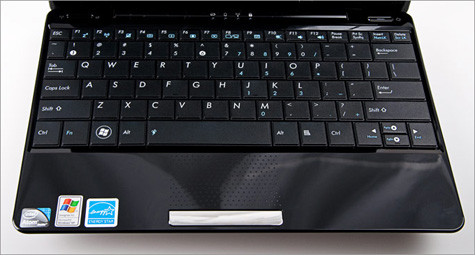
Click to enlarge
Display and Audio
The 10.1-inch, 1024 x 600-pixel resolution backlit LED display on the 1008HA allows Web pages and windows to fit to size on the screen. Colors on the glossy display looked a bit washed out when viewed at close to a 90-degree angle. We had to push the screen back 40 to 45 degrees before we saw the deep colors we expected. Horizontal viewing angles are decent; three people can watch a video in a dimly lit room, but under normal lighting the screen tends to throw back glare at more acute angles.
A streaming clip of Saturday Night Live from Hulu looked smooth, and colors were bright. From afar, the inch-thick glossy black bezel looked as if the screen was flush with the frame. Up close, however, you can clearly make out the raised frame.
The speakers located at the bottom front edge of the system allowed us to hear videos loud and clear from across the room. Similarly, when we listened to Miley Cyrus' "The Climb," it was loud but provided the usual netbook tinniness.
Ports and Webcam
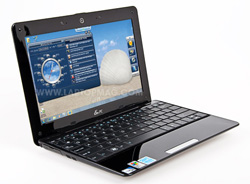
Click to enlargeAll of the ports on the 1008HA are covered with plastic tabs, giving the 1008HA its uniform look. As with the MacBook Air, this thinner profile requires some compromises. On the left side are USB and mini-VGA ports. Annoyingly, the VGA adapter is on the underside of the system; a small latch on the edge reveals a VGA dongle for connecting the notebook to a larger display.
On the right side are a 4-in-1 memory card reader, an additional USB port (bringing the USB total to two; most netbooks have three), and headphone and microphone jacks. The Ethernet port (also on the right side) has been shrunk: the bottom lip of the port pulls down to make room for the plug.
Above the display, the 1.3-megapixel webcam provided average-quality images in a Skype video chat. Our friend saw a little motion blur when we waved quickly, but easily made out details on our face and surroundings.
Performance and Heat
ASUS kept the guts mostly the same for the 1008HA's Windows 7 update. It's configured with the same 1.66-GHz Intel Atom N280 processor, but comes with 2GB of RAM instead of 1GB. Its score of 1,118 on PCMark Vantage is just above the netbook average of 1,103, though there are very few systems on which we've been able to run this test so far. The 1008HA's Geekbench score of 826 is just shy of the netbook average (830) and 21 points above the Toshiba mini NB205-N330BL running Windows 7. However, it's about 70 points behind the 1008HA running XP (892), the Sony VAIO X (963) and the HP Mini 311 running Windows XP (888).
This relatively strong performance carried over in our day-to-day computing tasks; simultaneously conducting video calls over Skype and surfing the Web with multiple tabs open didn't cause any system hang ups.
The updated 1008HA has a larger hard drive--320GB, up from 160GB on the original--but the same speed (5,400 rpm). On our LAPTOP Transfer Test, in which we copy a 4.97GB mixed-media folder, the Eee PC 1008HA notched a score of 22.2 MBps. This score is slightly lower than the XP counterpart (23.1 MBps) but still well above the average score of 15.2 MBps and both the Toshiba mini NB205 (17.9 MBps) and the HP Mini 311 (15.6 MBps). Though the 1008HA's 1-minute boot time is 5 seconds shorter than average for netbooks, it beats the mini NB205's Windows 7 boot time by 7 seconds.
The Intel GMA 950 integrated graphics chip (with 256MB of shared memory) delivered a score of 151 in 3DMark06, which is 68 points higher than this netbook's previous score under Windows XP and 52 points above the netbook average of 99. As before, we were able to play a 720p HD clip of The Discoverers, downloaded from the Windows Media Video HD Content Showcase, without any hiccups or pauses. We also transcoded a 5:05 MPEG-4 video clip (114MB) to the AVI format using HandBrake; the system completed the task in 29 minutes and 10 seconds. This was slower than the XP score by almost 2 minutes, yet 31 seconds faster than the netbook average.
We noticed that the bottom of the netbook got very hot during normal usage and while running tests, even when sitting on a passive cooling platform. During our transcoding test, we measured the temperature to be between 95 and 115 degrees across the underside of the chassis.
Battery Life and Wi-Fi
The Eee PC 1008HA Seashell comes with a high-density, 32-W/h lithium polymer battery instead of the more traditional lithium ion battery. On the LAPTOP Battery Test, which assesses endurance by surfing the Web until the battery dies, this netbook lasted 4 hours and 43 minutes. This is about an hour less than the time the 1008HA was able to achieve running Windows XP, which is surprising given Microsoft's claims that Windows 7 improves battery life.
This score is also well under the six-cell category average (6:10), and hours behind category leaders like the Toshiba mini NB205-N330BL (8:51); even the HP Mini 311, which has Nvidia Ion graphics, gets an hour more of battery life. Considering the 1008HA's battery fits flush with the system, some users may find this trade-off acceptable. However, the battery on the 1008HA is integrated with the netbook, and it cannot be removed or replaced with an extended battery.
The Eee PC 1008HA's 802.11b/g/n Wi-Fi card provided a solid connection for working on the Web. Delivering 25.5 Mbps and 19.3 Mbps from 15 and 50 feet, respectively--both well above average--we were able to maintain a strong signal far from our access point. Streaming music videos over YouTube and music over Blip.fm was seamless. This netbook also includes Bluetooth 2.1 + EDR connectivity, which is good for making wireless Skype calls with a headset, or using your cell phone as a wireless modem.
Software
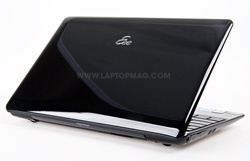
Click to enlargeUnlike the Toshiba mini NB205-N330BL, the Eee PC 1008HA isn't limited by the Starter Edition of Microsoft's newest OS. Instead, it's running Windows 7 Home Premium. Whereas Starter denies users the slick Aero Glass interface and the ability to change desktop design schemes (including the background), Home Premium includes all the functionality mainstream consumers expect.
ASUS also included its Eee Dock in this release for fast access to ASUS-branded software. A crystal-colored pull-down tab sits unobtrusively on the desktop, and when clicked it offers four groupings: Eee Amuse, Eee Sharing, Eee Tools, and Eee Xperience. The dock is somewhat customizable; under Eee Tools you can set which ASUS software or links to include. Users can't pin any other programs to the dock, though.
We enjoyed a few of these ASUS-branded apps, including the ASUS @Vibe music and games entertainment portal and ASUS WebStorage. Eee PC users get a whopping 500GB of online storage space free for a year ($39.99 annually thereafter for unlimited storage) to store or share files online. Users can also set up automatic backups to their online accounts that will occur incrementally in the background. Advanced users will enjoy ASUS' Super Hybrid Engine software for overclocking or underclocking the 1008HA.
Other ASUS programs include the Dr. Eee voice command module. The software was able to recognize our voice 95 percent of the time, and quickly carried out the simple commands we gave it. Though it's fun finding global weather information and currency exchange rates by talking to the computer, users still have to use the mouse to open the program and choose the mode. Vocal command over Windows Media Player and Skype would be useful if, again, the user didn't have to switch to Dr. Eee and click on the icon to activate the commands window. We'd like to see this feature evolve a bit more so that it recognizes which program and task it should execute solely from the voice command, making only one click or key press necessary.
Beyond ASUS' proprietary offerings, the 1008HA comes with a 60-day trial of Microsoft Office, the Office Live Add-In, Microsoft Works Suite, Skype, and a trial of Trend Micro Internet Security.
Green Testing
The Windows 7 version of the 1008HA is slightly less green than its XP counterpart, taking 2 hours and 22 minutes to fully recharge, and consuming 3706.2 watts during that time. Its LAPTOP Battery Efficiency Rating (total watts divided by battery life) of 13.1 is 2.0 watts higher than the XP version, but still comfortably under the netbook average of 18.0.
Configuration Options and Warranty
The only other configuration ASUS offers is the $429 Windows XP version we previously reviewed, which had 1GB of RAM instead of 2GB. ASUS will discontinue this version by the end of the year and sell the Windows 7 model exclusively. The 1008HA is available in white, black, pink and blue.
ASUS backs this netbook with a standard one-year limited warranty with six months of battery coverage and 24/7 toll-free tech support.
Verdict
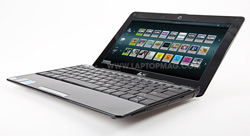
Click to enlargeThe Eee PC 1008HA Seashell is still one of the slimmest and most attractive netbooks on the market, and with this update you get double the RAM and hard drive space. However, the shortened battery life will give many consumers pause, especially with a $479 price tag. While the Toshiba mini NB205-N330BL runs the more limited Windows 7 Starter Edition and has a smaller 250GB hard drive, it offers comparable performance, lasts nearly 9 hours on a charge, and costs $80 less. Even the $399 HP Mini 311, which has a bigger screen and Nvidia Ion graphics, lasts an hour longer. Still, we can't discount the lure of the slim and light design, high style, and 500GB of online storage that you get with the 1008HA.
ASUS Eee PC 1008HA Seashell (Windows 7) Specs
| Bluetooth | Bluetooth 2.1 EDR |
| Brand | ASUS |
| CPU | 1.66-GHz Intel Atom N280 |
| Card Slots | 4-1 card reader |
| Company Website | http://usa.asus.com/ |
| Display Size | 10.1 |
| Graphics Card | Intel GMA 950 |
| Hard Drive Size | 320GB |
| Hard Drive Speed | 5,400rpm |
| Hard Drive Type | SATA Hard Drive |
| Native Resolution | 1024x600 |
| Operating System | MS Windows 7 Home Premium |
| Ports (excluding USB) | VGA, Microphone, Headphone, Ethernet |
| RAM | 2GB |
| RAM Upgradable to | 2GB |
| Size | 10.3 x 7.0 x 1.0 inches |
| USB Ports | 2 |
| Video Memory | 256MB |
| Warranty/Support | One-year limited, six months for battery, 30-day Zero Bright Dot/24/7 toll-free phone |
| Weight | 2.2 pounds |
| Wi-Fi | 802.11b/g/n |