1. The list in brief
2. Best overall
3. Best chromebook
4. Best for gaming
5. Best workstation
6. Best battery life
7. Best handheld
8. How to find the right laptop
9. How we test
10. Why trust Laptop Mag
The best Asus laptops you can get are hidden among the company's expansive portfolio of laptops. It can be overwhelming to figure out which one is best for you. There are so many! Good news: we've sifted through Asus' massive line-up of laptops so you don't have to.
Asus did incredibly well in our best and worst laptop brands battle (our annual competition of which laptop companies reign supreme), and it's not hard to see why. Asus' impressive innovations (we love their dual-screen laptops) and economically priced notebooks keeps this laptop maker high in the industry's esteem.
The best laptops from Asus are known for their mind-blowing, state-of-the-art innovation. After all, Asus doesn't want to get lost in a sea of boring laptops. Instead, it wants to stand out of the crowd and offer powerful performance in a laptop while still tackling the challenge of portability. That being said, we've tested a cornucopia of Asus laptops, including their battery runtimes, display quality, sturdiness, and more. With this information, we've compiled a well-tested list of Asus' best laptops.
Note: ASUS recently announced some exciting new laptops at CES 2024, including the Asus Chromebook CM30 which could knock its predecessor, the CM3, off this list. Other new arrivals include new gaming contenders and laptops featuring AI chips from Intel and AMD. Stay tuned for all our upcoming reviews!
We're also looking forward to the new Asus ROG Zephyrus G14, as its 2020 model is one of the few laptops we've given a perfect score. But since then, we've found it experience a severe dip in quality, especially in regards to its battery life. With a new model having been announced at CES 2024, we're excited to see how it holds up to our expectations.
The Quick List

Best Asus laptop overall
The Asus Zenbook 14 Q409ZA OLED has a 2.8K panel with a 16:10 aspect ratio, and thanks to the fact that it's an OLED screen, it's colorful and a total visual treat. Adding to the cherry on top, it's super responsive, thanks to its 90Hz refresh rate.

Best Asus Chromebook
The Asus Chromebook Detachable CM3 can survive for nearly 12 hours on a single charge. It's also a 2-in-1, which means that it can transform into a number of different positions with that beautiful 10.5-inch, 1900 x 1200-pixel touchscreen.

Best Asus gaming laptop
The Asus Strix Scar 18 is large and in charge. But it’s not just the 18-inch display that wows The uber-powerful Core i9 CPU and Nvidia RTX 4090 GPU make the Strix Scar an undeniable beast of a gaming laptop.

Best Asus workstation
The Asus ZenBook Pro 15 Duo stands out as a dual-display workstation laptop, which is convenient for the professional working on the go and doesn’t have access to another screen.

Best battery life
The lightweight Asus ExpertBook B9450 measures 12.6 x 8 x 0.6 inches and weighs just 2.2 pounds. In terms of all-day endurance, it absolutely blew us away with a record-setting runtime of 16 hours and 42 minutes.

Best for handheld gaming
While the Asus ROG Ally may not technically be a gaming laptop, its Windows 11 OS and excellent performance metrics make one thing clear: This is a great gaming laptop at heart.
Best Overall

The Zenbook 14 Q409A earns it's place as the best overall Asus laptop thanks to its 11-hour battery life, striking display, spacious touchpad and fair price. Coming in at just $749, this is an incredibly budget-friendly laptop that also outperforms many other options at this price point.
The Zenbook 14 Q409A configuration we reviewed features a 2.8K 16:10 OLED display, a 12th Gen Intel Core i5 CPU, Intel Iris Xe integrated graphics, 8GB of RAM and 256GB of SSD storage. There are other configurations with more storage and RAM as well as different CPUs if you're looking for a bit more power, although upgrades will increase the price.
Regardless of the configuration you go with, you'll get the same stellar design. This laptop has a huge trackpad that doubles as a number pad. So, you'll love this laptop if you prefer a trackpad over a mouse. Plus, the battery life on the Zenbook 14 Q409A is incredible, lasting exactly 10 hours and 52 minutes in our test. If you're a student or use your laptop on the go a lot, you won't have to worry about this one dying on you.
See our full Asus Zenbook 14 Q409A OLED review.
Best Chromebook

The Asus Chromebook Detachable CM3 is not only the best Asus Chromebook, it's one of the best Chrome OS devices we've ever tested. It earns that praise with its incredible 12-hour battery life, 2-in-1 design and vivid display. It's also affordable, starting at just $329.
For that price, you get a MediaTek MTK 8183 processor, 4GB of RAM, 64GB of storage, and a magnetic case and keyboard. If you want more storage, you can upgrade to 128GB which bumps the price up to $389.
This is a super durable device. It meets military-grade durability standards and the fabric case is stain-resistant. That makes the CM3 a fantastic device for kids, students or anyone who needs a rugged, portable device for a budget-friendly price. The CM3 isn't cheap, though. It's sleek and lightweight and performs well in either tablet or laptop mode.
See our full Asus Chromebook Detachable CM3 review.
Best for gaming

The Asus ROG Strix Scar 18 is not only the best Asus gaming laptop, it's also one of our best gaming laptops overall. This is an entertainment beast, boasting an 18-inch 2560 x 1600 display with a 240Hz refresh rate. Under the hood it has a 13th Gen Intel Core i9-13900HX CPU, an Nvidia GeForce RTX 4090 GPU with 16GB of VRAM, 32GB of RAM, and a pair of 1TB RAID 0 SSDs.
With hardware that powerful, it's no surprise that the Strix Scar 18 demolished every test we threw at it. On Geekbench 5.4 it earned a whopping 19,233, almost double the premium laptop average. It also far outperformed competitors from Alienware, MSI and Razer in our gaming tests, consistently clocking over 100 FPS at 1920 x 1080p.
The only areas where the Strix Scar 18 struggles are battery life and webcam quality. Like most gaming laptops, the battery life isn't great at just 4 hours and 26 minutes in our tests. The webcam is also 720p, which is disappointing for a laptop that costs almost $4,000. It's tough to beat the Strix Scar 18 in sheer gaming performance, though.
Read our full Asus ROG Strix Scar 18 review.
Best Workstation

Multiple displays are fantastic for improving productivity, but you don't need a desktop to get those additional screens. The Asus ZenBook Pro 15 Duo features dual OLED touch displays, making it a workstation powerhouse. On top you get a 15.6-inch 4K main display and in the bottom half you have the 15.6 x 4.5-inch IPS ScreenPad Plus.
That built-in second display is great for multitasking on the go. It's powered by some impressive hardware, too. Our review unit included an 11th Gen Intel Core i9 CPU, an Nvidia GeForce RTX 3070 GPU with 8GB of VRAM, 32GB of RAM, and 1TB of SSD storage. It scored well on Geekbench 5.4, coming in at 7,028.
The only real drawbacks to this laptop are the price and the awkward keyboard and trackpad setup. That second display bumps the keyboard down, so the trackpad is off in the bottom right corner. That orientation isn't for everyone, especially if you prefer to use your trackpad with your left hand. The ZenBook Pro 15 Duo is also a bit pricey starting at $2,299.99 ($3,019.99 as reviewed).
See our full Asus ZenBook Pro 15 Duo (UX582L) review.
Best Battery Life

The Asus ExpertBook B9450 literally set a record for battery life when we reviewed it, lasting a jaw-dropping 16 hours and 42 minutes. In fact, we didn't believe the results the first time around and asked our lab tester to rerun the test! The ExpertBook B9450 put our skepticism to rest by lasting 16 hours for a second time.
With battery life like that, you can leave your charger at home. The ExpertBook B9450 is surprisingly light, too, weighing in at just 2.2 pounds. That combined with the incredible battery life makes this laptop a fantastic choice for commuters or anyone who travels frequently.
See our full Asus ExpertBook B9450 review.
Best handheld
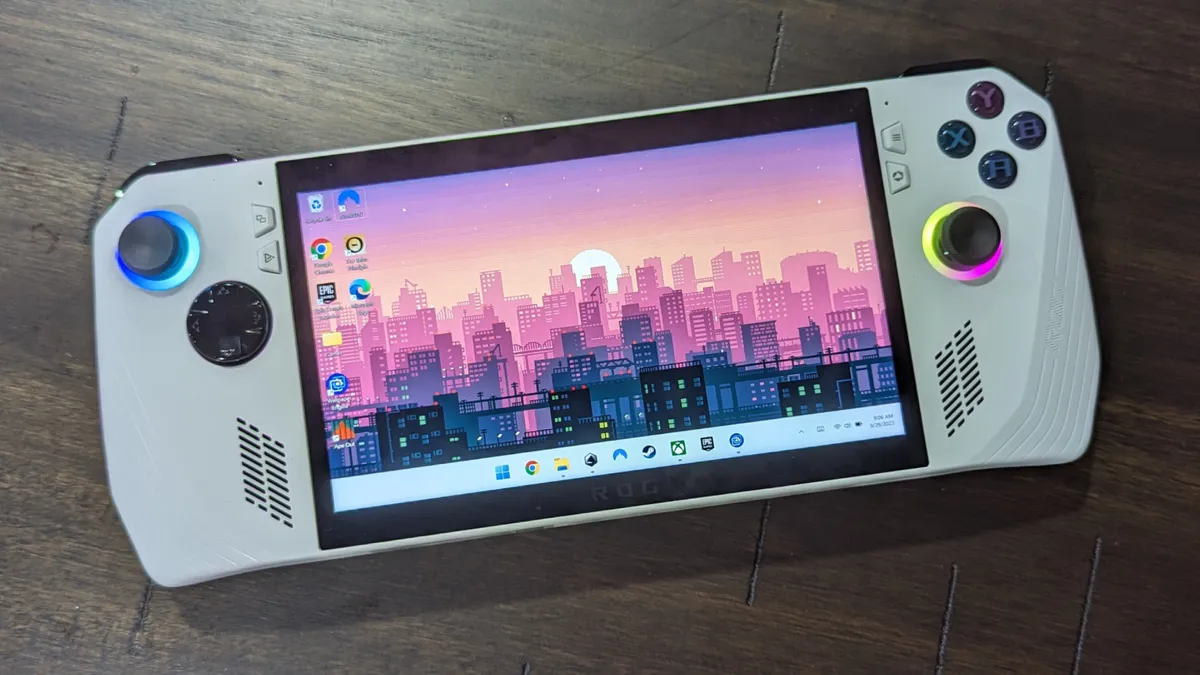
When is a gaming laptop not a laptop? When it's a handheld gaming PC! If you're looking for a mobile PC gaming device, you're no longer limited to laptops. For a lot of gamers, the Asus ROG Ally handheld gaming PC is a much better choice. It costs less than most gaming laptops yet performs on par with one, all in a compact form factor Nintendo Switch fans will be familiar with.
The Ally runs on Windows 11 so it can actually do everything you could do on a gaming laptop. It features a 3.3GHz AMD Ryzen Z1 Extreme processor, AMD Radeon graphics RDNA 3 with 4GB of VRAM, 16GB of RAM and 512GB of SSD storage. If you ever want to play on a larger screen, you can connect it to a TV or display, connect a gamepad and play from the comfort of your couch.
The Ally has incredible value for mobile PC gamers. Even its most expensive configuration is just $699. The Ally just goes to show, sometimes the best gaming laptop isn't a laptop.
See our full Asus ROG Ally review here.
How to choose the best Asus laptop for you
Do your intensive daily workloads require more RAM than the average Joe? Are you a video editor who needs extra storage? Are you a gamer who wants a powerful GPU? Sorting through the best Asus laptops to fit your lifestyle is a tricky business.
To make your shopping process a little easier, our Editor-in-Chief Sherri L. Smith has put together some tried-and-true guidelines to help you choose the best laptop.
Budget: What you get for the money.
You can find decent Windows laptops and high-quality Chromebooks for under $500. However, better mainstream laptops usually cost more than $700 and premium Ultrabooks can run over $1,000. The best gaming laptops can cost $2.000 and up, but you can play the latest titles at decent frame rates on gaming laptops under $1,000.
Screen Size: 12 to 14 inches for Portability
Knowing a laptop's screen size tells you a lot about its portability overall. If you want to use your computer on your lap or carry it around a lot, go for one with a 12, 13 or 14-inch display. If you want to use the computer on tables and desks and won't carry it around much, a 15-inch model may give you more value. Some gaming rigs, media machines and workstations even have 17 or 18-inch screens, but those are hardest to carry.
2-in-1 or Clamshell?
More and more of today's laptops are 2-in-1s with screens that either bend back 360 degrees or detach so you can use them as tablets. If you like the idea of using your laptop in slate mode for drawing, media consumption or just using it standing up, a 2-in-1 could be for you. However, you can often get better features or a lower price by going with a traditional clamshell-style laptop.
Battery Life: 8+ Hours for Portability
Unless you only plan to use your laptop on your desk, battery life matters. Even within the home or office, having plenty of juice enables you to work on the couch or at the conference table, without being chained to the nearest outlet. For the best portability, we recommend getting a laptop that lasted over 8 hours on the Laptop Mag Battery Test. The longest-lasting laptops endure for over 10 hours.
Specs: 1080p / Core i5 / 8GB Are Best Bets
You can spend a lot of time delving into specs, but here are the key components to think about. If you just want really good mainstream performance, go for a Core i5 CPU, 8GB of RAM, a 256GB SSD and a 1080p screen.
How We Test the Best Asus Laptops
We put each laptop through extensive benchmark testing — both synthetic and real-world — before they end up in the hands of our reviewers. We evaluate each aspect of the laptop, including its performance, battery life, display, speakers and heat management.
In our benchmark testing, we use a Klein K10 colorimeter to detect the brightness and sRGB color gamut of the laptop's display. For performance testing, we run the laptop through a gauntlet of benchmarks, including Geekbench 4.3 and 5.0 and 3DMark professional graphics tests.
To determine real-world performance, we task the laptop to convert a 4K video to 1080p resolution and to duplicate a 4.97GB multimedia file. Our real-world graphics test is the Dirt 3 benchmark with medium settings at 1080p resolution.
We also run heat tests by playing a 15-minute full-screen video and measuring temperatures in different areas of the laptop. Last but not least, our battery test consists of continuous web surfing over Wi-Fi at 150 nits of brightness. For MacBooks and premium Windows 10 laptops, a runtime of over 9 hours is considered a good result whereas gaming laptops and workstations that can stay powered for longer than 5 hours deserve praise.
These tests are complemented with extensive hands-on testing from our reviewers who critique everything from the laptop's materials to the feel of its touchpad.
See this page on How We Test Laptops for more details on our benchmarking procedures.
Why Trust Laptop Mag
Laptop Mag reviews over one hundred different laptops every year, from paperweight ultralights to everyday workhorses to lumbering gaming notebooks that scorch the frame rates of even the hottest AAA games. We're not just experts in the laptop field, as we go one step further by meticulously testing smartphones, tablets, headphones, PC accessories, software, and even the latest in gaming.
We are 100% independent and have decades of experience to help you buy with confidence. In fact, Laptop Mag has been testing and reviewing products for three decades, and we continue to deliver trustworthy reviews you can rely on.
Our experienced team of writers and editors scour the available information about the laptop and put it through its paces to determine which is best for you. But before they start, the testing team subjects each system to a rigorous regimen of synthetic and real-world tests to see how a system handles the type of work and games you’re most likely to throw at it.
Our editorial trustworthiness is enforced by one of the world's largest technology publishers, Future Publishing. As a company, we have unrivaled experience across every tech sector — and we're the group's specialist for all things mobile tech.